MathNotepad
A downloadable tool
MathNotepad — User Guide
What is MathNotepad?
MathNotepad is a calculation notebook that sits between a calculator and Excel.
You can:
- Type calculations like a notepad
- Define formulas once and reuse them
- Change values and instantly see updated results
- Generate tables and graphs without copying formulas
- Explore “what-if” scenarios easily
If Excel feels like too much setup, and a calculator feels too limited — MathNotepad is for you.
The Screen Layout
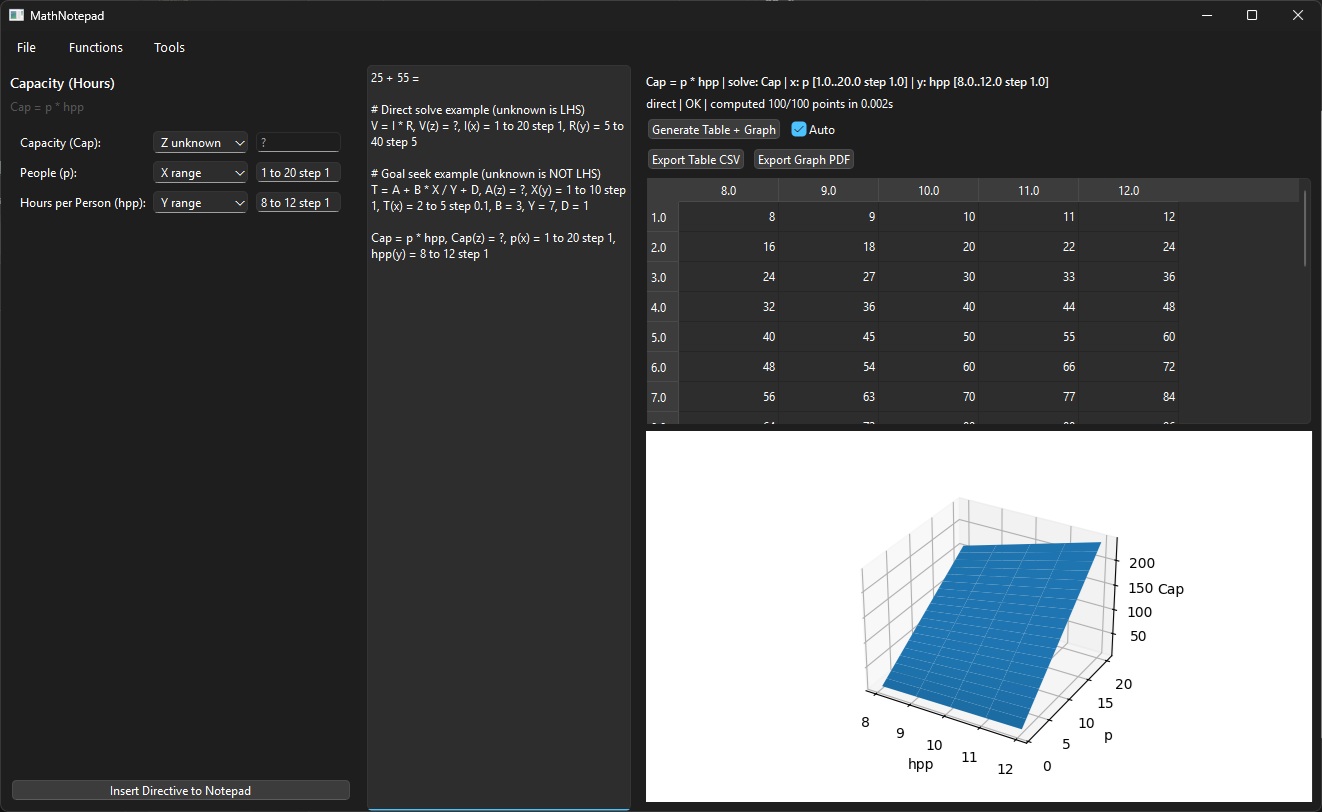
MathNotepad has three main areas:
1. Function Drawer (left)
- Pick a pre-built formula (engineering, finance, project management, etc.)
- Set values, ranges, and what you want to solve for
- Insert the formula into your notepad
2. Notepad (center)
- This is where you type calculations and formulas
- Each line stands on its own
- MathNotepad remembers formulas and recalculates automatically
3. Results Pane (right)
- Shows tables and graphs for the selected formula line
- Lets you export tables to Excel and graphs to PDF
Quick Calculator Mode
You can use MathNotepad like a calculator.
Example
Type:
25 + 55 =
Press Enter MathNotepad fills in:
25 + 55 = 80
This is great for quick math without switching tools.
Formula Lines (The Core Feature)
A formula line combines:
- an equation
- values, ranges, and/or unknowns
Basic structure
equation, variable definitions
Example
V = I * R, V(z) = ?, I(x) = 1 to 20 step 1, R(y) = 5 to 40 step 5
This means:
- Equation:
V = I * R - Solve for V
- Vary I along the X-axis
- Vary R along the Y-axis
- Generate a table and graph of results
Click anywhere on this line to see results on the right.
Understanding Variable Roles
Each variable can play one role:
Constant
A fixed value:
PV = 315000
X range
A range of values plotted along the X-axis:
n(x) = 1 to 30 step 1
Y range
A second range for 2D tables/graphs:
r(y) = 0.03 to 0.08 step 0.01
Z unknown (what you solve for)
The value MathNotepad calculates:
FV(z) = ?
Only one variable should be the Z unknown.
Using the Function Drawer
- Go to Functions in the menu
- Choose a category and formula
- The left drawer updates with:
- Variable names
- Drop-downs to select each variable’s role
- Fields for values or ranges
- Click Insert Directive to Notepad
MathNotepad inserts a ready-to-use formula line.
Auto-Solving Constants
If:
- All but one variable have numeric values
- One variable is left unknown
MathNotepad will solve it immediately and insert the answer.
Example
If you enter:
x1 = 20w1 = 23x2 = 5w2 = 44- leave
avgunknown
MathNotepad inserts:
avg = (x1*w1 + x2*w2) / (w1 + w2), avg(z) = 11.6678, x1 = 20, w1 = 23, x2 = 5, w2 = 44
No guessing. No copy-pasting.
Tables and Graphs
When a formula line includes:
- one range → 2D graph
- two ranges → table + surface graph
Generate results
- Click the formula line
- Results appear automatically (if Auto is checked)
- Or click Generate Table + Graph
Exporting
- Export Table CSV → paste into Excel
- Export Graph PDF → share or print
You can also:
- Select cells in the table
- Press Ctrl+C
- Paste directly into Excel
Goal-Seeking (Solving for a Variable)
MathNotepad automatically switches modes when needed.
Example
T = A + B * X / Y + D, A(z) = ?, X(y) = 1 to 10 step 1, T(x) = 2 to 5 step 0.1, B = 3, Y = 7, D = 1
MathNotepad:
- Solves for A
- For every combination of X and T
- Without copying formulas
This works even when the unknown is not on the left side of the equation.
Word Wrapping & Multi-Line Safety
You don’t need to worry about text wrapping.
- A formula can visually wrap across lines
- MathNotepad still treats it as one instruction
- Pressing Enter creates a new formula line
Saving Your Work
You can save:
- Text (.txt) — simple and portable
- HTML (.html) — keeps formatting
Open saved files anytime and continue working.
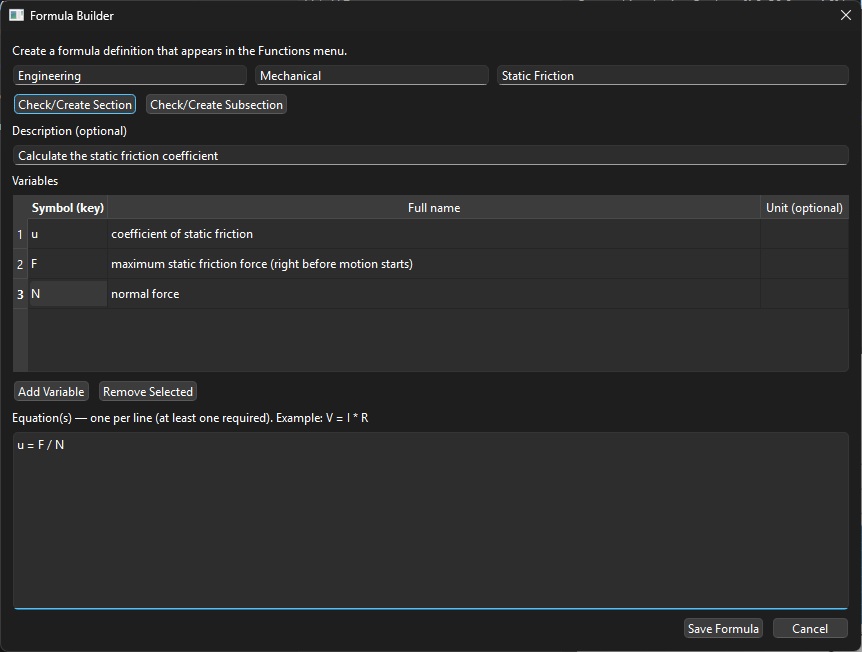
Formula Builder (Advanced)
Use Tools → Formula Builder to:
- Create your own formulas
- Organize them into sections and sub-sections
- Reuse them like built-in formulas
Saved formulas appear instantly in the Functions menu.
Common Mistakes (and Why They’re Helpful)
“The number is huge — is this wrong?”
MathNotepad always trusts your inputs.
Example:
r = 1.06
Means 106% per period, not 6%.
Correct input for 6%:
r = 0.06
MathNotepad won’t guess — and that’s a feature.
What MathNotepad Is (and Isn’t)
It is:
- A thinking tool
- A scenario explorer
- A calculator that remembers formulas
It is not:
- A spreadsheet replacement
- A black box
- A tool that hides assumptions
Final Tip for New Users
If a result surprises you:
- Check the formula
- Check the values
- Try plotting it
MathNotepad is designed to make assumptions visible — not hide them.
-------
AI Note: This project was vibe programmed to put out something that tries to fit some users' needs. If you find this useful, use it! If not, feel free to leave it be or to edit it. It's GPL, so you can toy with the source code (included) and improve it. Help file was also generated with AI.
If folks find it to be very valuable, I may put more time into to squeeze in more features and ease of use. Not it works quite well as is.
You may have alerts on windows when running the .exe. Windows can even sometimes delete it. This happens with frozen python programs quite often. If that’s happening to you and you want to try to run the source code independently I have provided the source code and instructions on how to run as well.
Download
Click download now to get access to the following files:
Leave a comment
Log in with itch.io to leave a comment.